Step 1: Identify the scope
First, identify the scope of the FMEA. Teams need to document what they are going to analyze. For example, it could be a product, system component, or manufacturing process.
Tip: Be specific so the team knows the limits and can gather the right data.
Example: The team working in the aerospace industry can decide to analyze the landing gear retraction system instead of the entire aircraft hydraulic network.
Step 2: Assemble the team
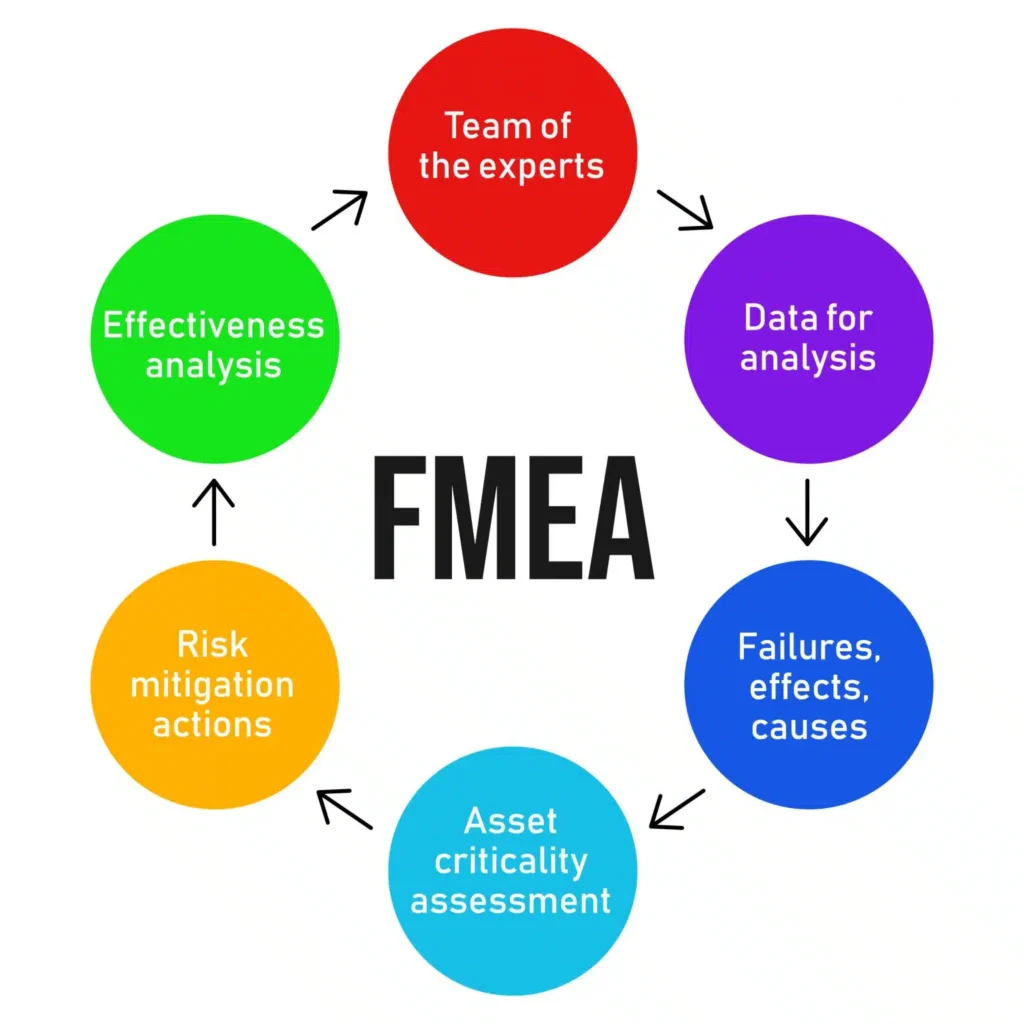
After that, assemble the team of people who clearly understand the product, process, or customer needs. Different views catch different problems.
Example: You can invite members such as a design engineer, test technician, quality lead, and a field service engineer who handles aircraft inspections.
Step 3: List functions and failure modes
Once the team and FMEA document are ready, team members start the brainstorming session to identify failure modes. They must analyze every system, component, or product that could fail.
Tip: Instead of writing an assumption, write a proper description of when the system could fail.
Example: “Function: Extend and retract landing gear.”
- Failure mode: Actuator fails to retract fully during flight.
Step 4: Note effects and causes
For each failure mode, write the effect on the system and why it might happen. Separate the immediate effect from downstream consequences.
Tip: Ask “What happens next?” until the impact is fully clear.
Step 5: Rate severity, occurrence, and detection, and calculate RPN
Based on the analyzed failure modes and their effects, rate each criterion on a scale of 1 to 10:
- Severity: Defines the seriousness of the impact of failure.
- Frequency: It is the number of times failure is likely to occur.
- Detection: Defines how hard it is to detect possible failures.
Make sure to use consistent scales across the team.
Next, teams are required to calculate the Risk Priority Number (RPN) by multiplying Severity × Occurrence × Detection to get the risk score.
For example, let’s consider the ratings below for “Failure mode: Actuator fails to retract fully during flight.”
- Severity = 8 (affects flight safety)
- Occurrence = 4 (moderate frequency)
- Detection = 5 (difficult to detect mid-flight).
In this case, RPN = 8 × 4 × 5 = 160
Step 7: Plan and implement actions
After that, sort issues by RPN score to see which need action first.
For top risks, define clear actions, owners, and dates. Actions can be design changes, new checks, or process controls.
Tip: keep actions small and verifiable.
Step 8: Re-evaluate and document results
After actions are done, re-score the item and update the record. Keep the FMEA live so it reflects design or process changes.
Tip: Review the FMEA after any change to the product or line.
Bonus Tip: An FMEA is a continuous process that organizations should keep doing periodically.
The Most Common Types of FMEA and How They Differ
There are multiple types of FMEA, but we have covered a few common types here:
- Design FMEA (DFMEA): It involves identifying possible failures during the design stage of the product. In this, engineers break down the design into smaller components and identify failure modes for each component. This allows teams to find potential risks before the product is developed.
- Process FMEA (PFMEA): This type of FMEA identifies how the manufacturing or assembly process introduces errors. It involves looking at tooling, human operations, sequence steps, and equipment conditions.
- System FMEA: It examines the potential failure modes at the system level. It assesses interactions between multiple subsystems and external factors and finds potential risks.
- Consider this: Not every failure comes from the same sources. Issues can be in the design, process, system, etc. That’s why it is very important for teams to choose the right type of FMEA before starting the process.
Why FMEA Software Matters and the Key Features You Should Look For
Teams can use Microsoft Excel or Google Sheets to track the FMEA process for sure. But the real problem starts when the complexity of the project or processes grows. Teams start struggling with common problems such as version control, duplicate data, and lost updates.
These are the exact reasons why teams need dedicated FMEA software, which makes a real difference. It stores all information in one place, including risks, requirements, actions, tests, etc., and keeps every change traceable.
Below are some essential FMEA software features that help teams manage risk effectively:
- Single source of truth: The software should store all information, including requirements, tests, documents, reviews, etc., in one place. So, teams don’t need to switch between multiple tools.
- Real-time collaboration: It should allow multiple team members to work together on documents, work items, etc. Also, look for the software that offers role-based access control. So, admins can give the required level of access to every team member.
- Traceability links: It should allow each failure mode and effect to be linked to the related design or process requirements, test results, and corrective actions. So, teams can have end-to-end visibility.
- Automatic RPN calculations: This is the most important feature. You can look for AI features that automatically calculate the RPN score, sort failure modes according to the RPN, and prepare the report.
- Change tracking and version history: As the product evolves, teams are required to maintain different versions of design, FMEA documents, and all. In this scenario, the change tracking feature is very useful. It is very important to have a clear audit trail for regulatory and compliance reviews.
- Industry complaint: A good FMEA software is always designed to comply with global standards such as IATF 16949, ISO 9001, AS9100, ISO 14971, etc.
Modern FMEA software that has the above features brings discipline to a task that often slips into spreadsheets and assumptions. It delivers visibility, accountability, and control over the entire risk management process.
How Modern Requirements4DevOps Simplifies the FMEA Process and Strengthens Risk Management
Modern Requirements4DevOps is an FMEA software that helps teams manage FMEA-style risk analysis directly within Azure DevOps, without relying on a separate module or disconnected spreadsheets.
Key features of Modern Requirements4DevOps that help in the FMEA process:
- Smart Docs: Allows teams to create living documents by adding Azure work items to the document. For example, you can add a failure mode as a work item in Azure DevOps, and while creating the FMEA document, you can drag and drop a work item to add it. Then, when the failure mode updates, the document will also.
- Trace Analysis: It allows teams to create traceability matrices. So, teams can analyze how the failure mode is connected with requirements and what needs to be changed.
- Version Control: It allows teams to track the history of work items and documents.
- Copilot4DevOps (CP): It is an AI assistant that comes with Modern Requirements4DevOps. The Analyze feature of CP allows teams to analyze the risk associated with the product. Furthermore, the Dynamic prompts feature of CP allows teams to query AI for RPN-like prioritizations or gap analysis against standards. It can also prepare full reports of failure modes based on the RPN score.
Other than the above features, MR4DevOps also offers features such as Review management that help teams in reviewing failure modes and effects collaboratively without leaving the tool.
The best part is that the tool is compliant with global standards such as ISO 26262, DO-178C, IEC 62304, and ISO 13485, making it suitable for regulated development. So, it can be used across any industry, including automotive, healthcare, aerospace, government, etc.