A detailed guide on Model-Based Development
Learn more about model-based development, how it works, and why...
Developing software or an application starts with understanding what they want. But that’s often where teams get stuck. Misunderstood goals, missing details, or vague expectations can quietly derail even the most promising projects.
The Volere requirements specification template was developed to solve this problem. It provides teams with a structured approach to collect, organize, and review requirements, eliminating the need to get lost in technical jargon or lengthy documents that often go unread.
In this short guide, we will cover what the Volere requirements specification is, why it is important for requirements management, and the core component of the Volere template.
The Volere requirements specification template is a structured document that helps business analysts, project managers collect and organize project requirements. It was introduced by Suzanne and James Robertson in 1995 after observing that unclear requirements can lead to confusion and hours of wasted work.
This template provides you with a structured format to record what your software should do, who uses it, what limits exist, and what problems you might face in the future. But it doesn’t offer a step-by-step process to elicit requirements.
It’s mainly used in software and systems engineering. Most people outside that space have never heard of it. But in projects where missing a detail can cost a lot, this template makes things easier to track and harder to misread.
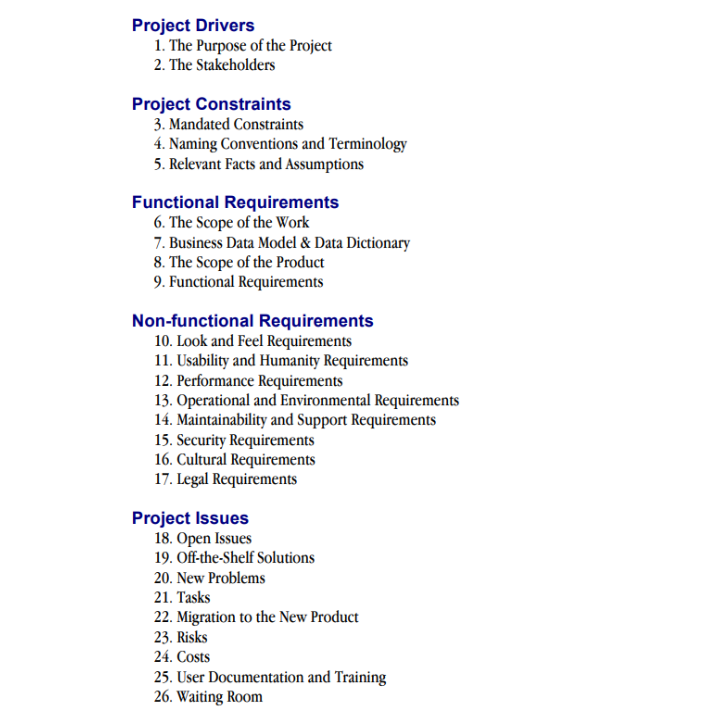
The Volere requirements specification template contains 5 components, which are explained below. These components also contain sub-components.
If you want an in-depth guide about the Volere requirements specification template, you can explore this PDF. The Volere template is available for free to students, and if you wish to use it for commercial purposes, a one-time fixed fee is required. Download the Volere template from here.
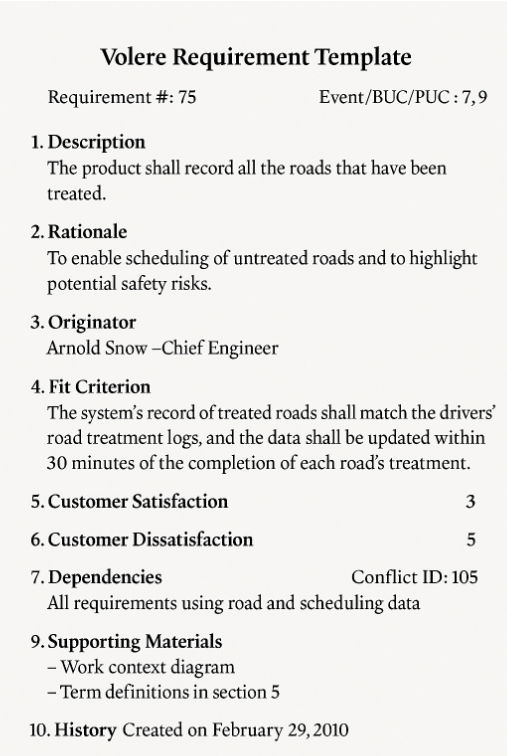
Once you have the template in hand, you can use the atomic requirements shell (also known as a “snow card”) to collect and visualize each requirement.
The atomic requirements shell provides a guide to write each atomic requirement. Each snow card contains information such as a unique identifier, description, requirements type, rationale, originator, fit criterion, etc., fields. If required, teams can also add additional fields.
Here is an example of the snow card.
Here is how the Volere template helps teams in improving their requirements management process:
The Volere template can indeed be used in Word or Excel, but it doesn’t support real-time collaboration. Nowadays, multiple members of teams are required to work collaboratively to manage edits, feedback, reviews, etc., and it is not possible using the Volere template.
To solve this problem, teams can start using the requirements management tools like Modern Requirements4DevOps, which works as an Azure DevOps extension.
It lets you create and manage requirements directly within Azure DevOps, with full end-to-end traceability, versioning, live baselines, and a review module for team feedback. It also allows teams to create requirements documents and reports directly from Azure work items.
The most important feature of Modern Requirements4DevOps is Copilot4DevOps, an AI assistant for requirements management. It lets teams elicit new work items from existing work items or documents, generate mockups and documents, perform impact assessment, and change analysis within seconds.
✅ Define, manage, and trace requirements within Azure DevOps
✅ Collaborate seamlessly across regulated teams
✅ Get started for FREE—no credit card required
Learn more about model-based development, how it works, and why...
Learn more about the requirements review process, and how reviewing...
Learn more about how a requirements management tool can eliminate...