DevSecOps Compliance Automation for Mission Systems: A Practical Guide for Government Programs
Government software teams spend more time proving compliance than building....
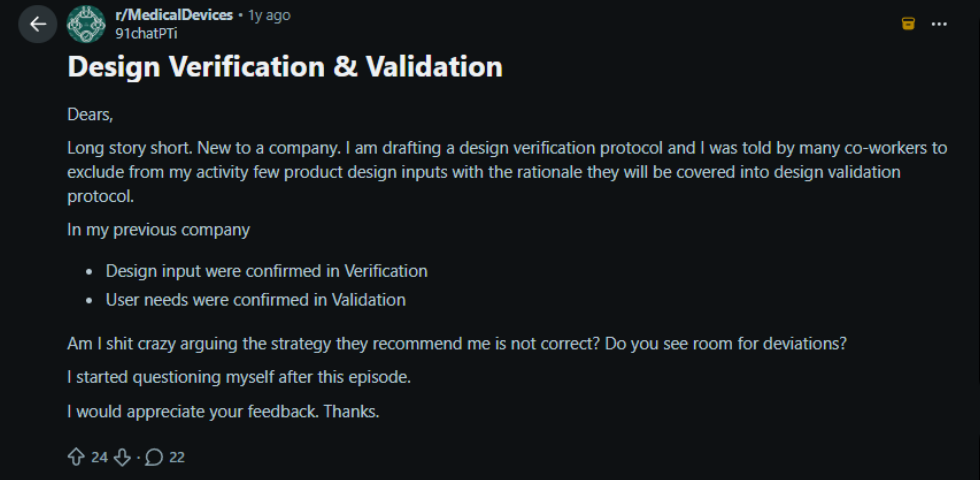
In regulatory industries, such as medical devices, automotive, and aerospace, product design quality is very important. Compliance standards such as 21 CFR Part 11 and ISO 9001 also expect teams to verify and validate their product designs before launching to market.
However, we’ve noticed that many people mix up design verification and validation. Also, a few are asking questions about the difference between the two terms on Reddit and Quora.
In reality, design verification checks the alignment of the design with input or pre-defined requirements. On the other hand, design validation checks that the product design meets user needs.
In this blog, you’ll learn the clear difference between design verification and validation processes, which will help you build safer products, meet audit expectations, and avoid last-minute compliance issues.
Design verification is the process of confirming that the design outputs meet every technical requirement your team documented at the start. You can think of it as checking your work against the blueprint.
Let’s understand it with an example of a blood glucose monitoring device:
If all test cases pass, you can assume that verification is complete.
Furthermore, design verification typically involves controlled checks such as:
In short, it helps in ensuring the product is built in the right way.
Design validation is a process to ensure the final product meets real users’ needs. You’re no longer comparing against specifications. You’re testing against real-world needs and messy, unpredictable conditions.
For the blood glucose monitoring device, design validation checks:
Furthermore, design validation usually includes activities such as:
In short, design validation answers a single question: Are we building the right product?
Criteria | Design Verification | Design Validation |
|---|---|---|
Objective | It checks that design outputs meet approved design requirements. | It ensures that the final product meets the user’s expectations and is built for intended use. |
Focus | Mainly focuses on technical correctness and requirement compliance | Real-world use, usability, and user expectations |
Question Answered | Are we building the product right according to the defined specifications? | Does the product solve the right problem for users? |
Reference Point | Functional requirements, non-functional requirements, design specifications, and compliance standards | User stories, workflows, and operating conditions |
Typical Activities | Unit testing, Integration testing, System testing, Code review, Design review, Simulation, Static analysis, and Hardware bench testing | User acceptance testing, Field trials, Beta testing, Clinical evaluation, Usability studies, and Pilot programs |
Timing | Performed during the product design and development phases | It is performed once the product development is completed or near release |
Participants | Engineering, QA, and technical teams | End users, customers, clinicians, or business stakeholders |
Outputs | Test reports, pass or fail results, compliance evidence | User feedback, acceptance records, validation reports |
Risk Addressed | Design defects and specification gaps | Usability issues, safety concerns, and adoption failure |
Design verification and validation play an important role in design controls. Companies that cut corners on verification and validation don’t just risk regulatory headaches, but they also jeopardize end users’ safety and their business viability.
Poor requirements management creates a domino effect that undermines both verification and validation. When initial requirements are not proper, vague, or incomplete, teams end up doing verification against an ambiguous target, which might lead to product failures.
Other than that, here are a few common challenges teams face during verification and validation phases:
Basically, strong requirements management helps teams to keep verification and validation aligned across the team.
Modern Requirements4DevOps operates directly within Azure DevOps as an extension, giving teams a single workspace to manage all requirements without switching between multiple tools. It helps in managing from user needs to the final test in one traceable system.
The traceability feature of Modern Requirements4DevOps allows teams to visualize how requirements are linked with test cases. This gives instant proof of which requirements are verified and which are pending.
The review and baseline features add the compliance layer teams need. By capturing electronic signatures during requirements reviews, teams can ensure that the verification and validation process satisfies FDA 21 CFR Part 11, ISO 13485, and IEC 62304 mandates.
Smart Docs helps in transforming static requirements into living documents. So, whenever any requirements change, documents automatically sync with changes, and no outdated document remains within your ADO workspace.
Furthermore, the built-in diagramming tools help in preparing workflow diagrams directly within Azure DevOps, which helps a lot to clarify complex validation scenarios. Also, automatic audit report generation directly from work item activity helps compliance teams to quickly prepare documentation and share it with approval teams.
Want to bring clarity to verification and validation processes with connected requirements, traceability, and audit-ready evidence inside Azure DevOps? Start a 30-day free trial of Modern Requirements4DevOps.
✅ Define, manage, and trace requirements within Azure DevOps
✅ Collaborate seamlessly across regulated teams
✅ Get started for FREE—no credit card required
Government software teams spend more time proving compliance than building....
Modern Requirements, a leading provider of requirements management software for...
Discover how AI is transforming the role of business analysts...
End-to-end requirements management in Azure DevOps.

AI-powered assistance for DevOps workflows.

Autonomous AI agents for DevOps execution.

Real-time data sync across tools and systems.